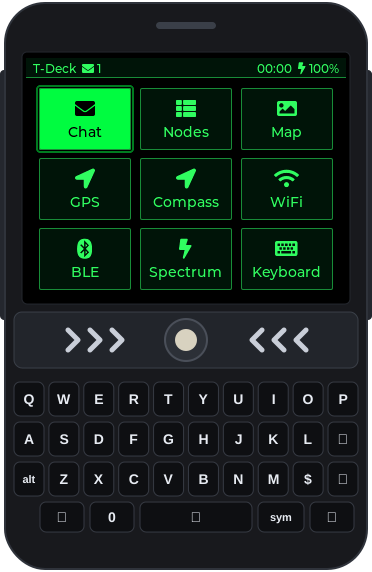
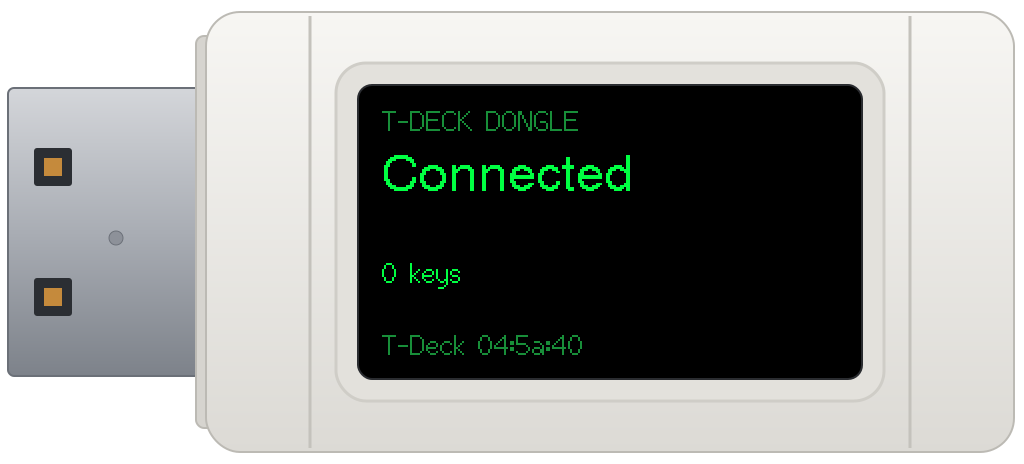
- Device
- LilyGO T-Deck Plus: ESP32-S3, 2.8" 320×240 touch screen, BlackBerry-style keyboard, trackball
- Radio
- SX1262 LoRa, 915 MHz
- Also on board
- Wi-Fi, Bluetooth LE, GPS, microSD, speaker
- Dongle
- Waveshare ESP32-S3-GEEK
- Software
- C++, LVGL 8, PlatformIO
It stays compatible with Meshtastic on the US LongFast channel, so it chats with stock Meshtastic nodes, and it adds what a pocket deck should do. The look is phosphor green on black, after the cmatrix terminal screensaver. Every app works from the keyboard and trackball, and the touch screen works too.
What's on it
Mesh
Chat on the LongFast channel and in direct messages, each message marked queued, sent, relayed or acknowledged, or failed. Direct messages use Meshtastic's public-key encryption, which Meshtastic 2.7 requires, and a tone plays for a new message when Chat isn't on screen. Nodes lists every node heard, with its name, when it was last heard, hops, signal, battery, distance and bearing; from there you can message it, ask for its position or info, or show it on the Map, which draws offline tiles from the SD card. The T-Deck also relays other nodes' packets, as a stock node does.
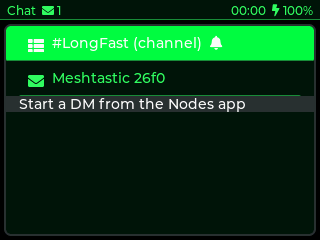
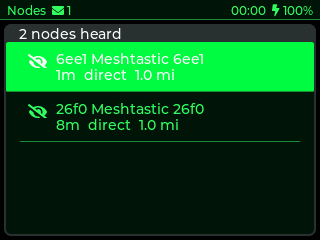
Radio tools
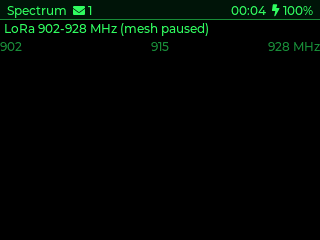
A WiFi scanner with each network's name, signal, channel, security and hardware address, and a count of networks per channel. A BLE scanner that flags item trackers (Apple Find My and AirTag, Tile, Samsung SmartTag, Google Find) and Meshtastic devices. And Spectrum, three waterfalls: LoRa sweeps 902 to 928 MHz with an automatic noise floor; WiFi hops channels 1 to 13 and draws each channel's 22 MHz hump; BLE gives each nearby device its own lane, with trackers in amber.
Position
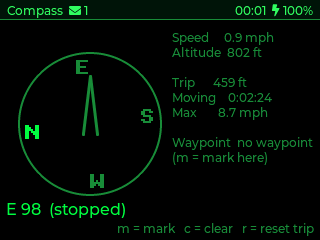
GPS finds the module on its own (Quectel L76K or u-blox M10), shows the fix, satellites, accuracy, position, altitude, speed and time, and sets the clock. Sharing your position on the mesh is a switch, off by default. Compass is a heading-up rose with speed, altitude and a trip counter (distance, moving time, top speed) that keeps counting with the app closed, plus a waypoint that survives a reboot. The T-Deck Plus has no magnetometer, so the heading comes from moving.
Keyboard and mouse for a computer
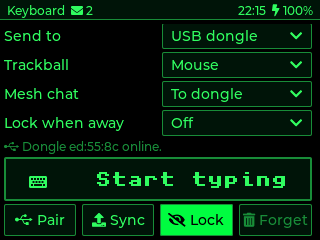
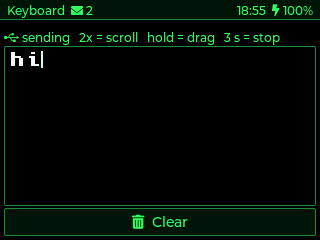
The Keyboard app makes the T-Deck a wireless keyboard and trackball mouse, two ways: over Bluetooth (pair "T-Deck Keyboard", no PIN), or through a USB dongle, a Waveshare ESP32-S3-GEEK that plugs into the computer and types what the T-Deck sends it. Pairing the dongle is a key exchange, and every packet after that is encrypted and numbered, so a recorded one can't be played back. The trackball moves the mouse with a speed curve, double-clicks into scroll mode and can drag. The typing screen is a small editor that mirrors the computer's text field: tap in the text and the computer's cursor moves with it.
The same link carries more than keys. With Mesh chat: To dongle on, chat messages reach the computer over the dongle's USB serial port and lines typed there go out on the mesh, so a small script makes the computer a Meshtastic terminal with no app. And the dongle's own memory card is a USB drive on the computer and a folder on the T-Deck at the same time: notes sync to it, the to-do list syncs both ways, and music comes from it.
Lock when away has the dongle lock the computer 10, 20 or 60 seconds after the T-Deck goes quiet, and a Lock button locks it at once.
Everyday
- Notes: plain text files on the SD card, edited on the device.
- To-do: a check list in a text file, kept in sync with the computer through the dongle. A line deleted on either side stays deleted.
- Files: an SD card browser with sizes and free space, a text viewer, and push and pull to the dongle.
- Timer: a stopwatch with laps, and a countdown that rings and wakes the screen from any app.
- Music: MP3 and WAV from the SD card through the speaker, folders as playlists, still playing with the app closed.
- Settings: names, radio preset and channel, transmit power, hop limit, relaying, position precision, brightness, screen timeout, time zone, message tone and radio statistics.
In a pocket, the screen fades after 10 seconds and locks, so stray key presses do nothing. Holding the trackball for a second unlocks it, and holding it for two locks it on purpose.
Flash it
Both halves install from this page, in Chrome or Edge on a computer, through ESP Web Tools. This is tdeck v0.2.1, the latest release.
Flashing replaces the firmware on the T-Deck and the dongle and can leave them unable to start, and the T-Deck runs on a lithium battery and a LoRa radio. You do this at your own risk. Legal
LilyGO T-Deck Plus
The tdeck firmware for the handheld.
- Plug it in with a USB-C data cable and press the button.
- If the browser can't connect (normal when Meshtastic or another firmware is running): turn the T-Deck off with the left-side switch, hold the trackball down, turn it on and keep holding for 2 to 3 seconds, then release. The screen stays black: that's download mode. Press the button again, and power-cycle the T-Deck when it finishes.
- Flashing erases what was on the T-Deck. To go back to stock Meshtastic, use flasher.meshtastic.org with the same download-mode steps.
Waveshare ESP32-S3-GEEK
The companion dongle: plugged into a computer, it's the T-Deck's keyboard, mouse, mesh terminal and shared drive.
- Hold the GEEK's BOOT button while plugging it into the computer. Its screen stays dark. Press the button above.
- Unplug it and plug it back in. The screen says Pairing.
- On the T-Deck open Keyboard, set Send to USB dongle and press Pair. The GEEK says Connected.
- This image wipes the GEEK's settings, so a GEEK that was already paired comes back in pairing mode.
The release (to flash by hand, with checksums) · the repo · dongle/README.md (to build the dongle yourself). The firmware is GPL-3.0.
How it is built
- ESP32-S3, in C++ on the Arduino core with PlatformIO.
- LVGL 8 for the interface, TFT_eSPI for the ST7789 panel, RadioLib for the SX1262 LoRa radio, NimBLE for Bluetooth and ESP8266Audio for playback. On the dongle, TinyUSB makes it a keyboard, a mouse, a serial port and a USB drive at once.
- The Meshtastic protocol is implemented directly: protobuf framing, channel hashing, AES-CTR channel encryption, public-key direct messages (X25519 and AES-256-CCM), NodeInfo, position and routing, all without the Meshtastic firmware's code.
- The dongle link runs over ESP-NOW: an X25519 key exchange to pair, then AES-CCM with an HMAC tag and a counter on every packet. Keys travel as press-and-release taps, so a lost packet never leaves a key stuck down.
- A serial console on the USB port drives every app and takes screenshots, so the device can be tested and photographed from a script; the dongle answers the same way. The screens on this page were captured like that.
Hard problems along the way
- Stale bands on the screen when an app first opened Cause: the display and the SD card share one SPI bus. The panel wants SPI mode 3 and the card mode 0, and on the ESP32-S3 the switch back reached the clock line after the panel's chip select had already gone low, so the panel dropped the first block of every redraw after a card access. Fix: one dummy byte in mode 3, with every chip select high, before each redraw.
- Lists that drifted apart Cause: the SD card doesn't mount on every boot, so on those boots the apps wrote to internal flash, and the next boot showed the stale copy on the card. Fix: load both copies, merge them, and retire the flash copy once the card holds the result.
- Scrolling with a trackball Cause: holding the button while rolling doesn't work (the ball barely turns when pressed in), and the keyboard reports no modifier keys. Fix: a double-click switches on a scroll mode, and a single click ends it.
- The dongle's USB name and product ID were ignored
Cause: the Arduino core starts USB before
setup()when the serial console is on at boot, too early for a custom name and ID. Fix: start USB fromsetup(), after setting them.
Status
In daily use on John's own T-Deck Plus and in active development. It's built change by change, each with an issue, a pull request and a review: 94 pull requests merged since 2026-10-22.
Credits
Firmware by John O'Dell, John-ODell/tdeck, GPL-3.0: the T-Deck Plus firmware and the GEEK dongle's. It uses LVGL, TFT_eSPI, RadioLib, NimBLE-Arduino, ESP8266Audio, TinyGPSPlus, Lewis He's SensorLib and, on the dongle, TinyUSB. Meshtastic® is a registered trademark of Meshtastic LLC; tdeck is not affiliated with it. The T-Deck Plus is made by LilyGO and the ESP32-S3-GEEK by Waveshare. The screenshots are from the device and the dongle. The Flash section uses ESP Web Tools by the ESPHome project (Apache-2.0), copied into this site.