Try it
This is the Pi's own code, compiled to run in your browser: the same games, drawn pixel for pixel on the HAT's 240×240 screen. Pick a game, then play with the buttons or your keyboard.
On a keyboard: click the screen, then ← ↑ → ↓ (or WASD) for the joystick, Enter or Space to press it, and Z X C for KEY1 to KEY3. Tap KEY3 to pause; hold it for 1.5 seconds to quit. High scores aren't kept here: each Play starts the game fresh. Radar's networks and devices are made up: a browser can't scan the air.
Music keeps playing when you switch games, as it does on the handheld: double-tap KEY3 in any game for its pop-up player. Here its seven tunes are made up for this page and played by your browser, and its Bluetooth speakers are pretend: connecting one plays the sound through your own speakers.
What's on it
A launcher menu opens at boot. Hold KEY3 for 1.5 seconds in any app to get back to it.
- Zero Strike, a vertical shoot-'em-up: waves of drones, divers and gunships, a boss every fifth wave, and a chain multiplier up to ×8.
- Sprout Run, a side-scrolling platformer over three levels: Sunny Meadow, Root Cavern and Dusk Canopy.
- Stack Zero, a falling-blocks puzzle with hold, a ghost piece, T-spins and combos, in Marathon or a 40-line sprint.
- Volt Dash, a high-speed momentum platformer with springs, ramps, rolls and a spin dash, across two acts.
- Night Lash, a gothic whip-and-stairs action platformer: one castle in five sections, ending in a fight with a giant bat.
- Radar, a Wi-Fi and Bluetooth scanner: nearby networks and devices by signal, each with a detail screen and a signal history. It only listens; it never connects or pairs.
- Pocket Chance, the pocket casino from the Pico build, ported to C, plus a no-limit Hold'em table against five bots. Its card games are on the Pico page, so they aren't repeated here.
- Music, a background player for MP3, FLAC and WAV through a Bluetooth speaker. It keeps playing during the games, with a pop-up player in every app (double-tap KEY3), and pairs and connects speakers from its Speaker screen. A phone page on the home Wi-Fi, behind a PIN, uploads songs and works the player.
- Desk, a clock, alarm clock, kitchen timer, stopwatch and status screen for when the Pi sits on a desk. The alarm rings a tone or a playlist on the days you pick, and snoozes.
- Network: home Wi-Fi first. Away from home the Pi makes its own hotspot and shows its name, password and a QR code for a phone to join. It can also join another network, typed in on an on-screen keyboard.
- Terminal, a pocket Linux terminal: the login shell on the 240×240 screen, typed on a USB or Bluetooth keyboard. Without one, the joystick and keys work as the arrows, Enter and Tab.
- Power: shut down or restart cleanly from the menu. With a PiSugar S battery, the menu shows whether it's on the charger or how long it's been on battery.
All the names and art are original.
- Board
- Raspberry Pi Zero W: 1 GHz single-core ARMv6, 512 MB, Wi-Fi and Bluetooth
- Screen
- 1.3" 240×240 IPS, ST7789
- Controls
- 5-way joystick, three keys
- Software
- C, on 32-bit Raspberry Pi OS
- SPI clock
- 62.5 MHz
The display stack
Every app sits on the same small layer that drives the HAT. Waveshare's demo code was too slow for games, so this one is written for speed:
- Display driver. spidev and direct GPIO register access at 62.5 MHz. It sends only the parts of the screen that changed, from a background thread, so the game never waits on the panel. No garbage on the screen at power-up, and the panel shuts down cleanly on exit.
- Framebuffer. RGB565 in the panel's byte order, with drawing primitives, sprites drawn from string art, and a built-in 5×7 font.
- Controls. All eight inputs are read in one register load, with internal pull-ups and low-latency debounce.
- A fixed-step game loop. The game logic runs at an exact rate. If the panel falls behind, frames are dropped and the game keeps its speed.
- Several backends, one codebase. The same apps build for the HAT, for an SDL2 window on a laptop, and headless for scripted tests and screenshots. Try it above is one more: this site's own backend for the browser.
Controls
| On the HAT | What it does | Keyboard here |
|---|---|---|
| Joystick | Move, choose | Arrows or WASD |
| Press | Select; in some games, jump or hold | Enter or Space |
| KEY1 | The main action: fire, jump, start | Z |
| KEY2 | The second action: bomb, run, whip, back | X |
| KEY3 | Tap to pause, hold 1.5 s to quit, double-tap for the music pop-up | C |
Screens
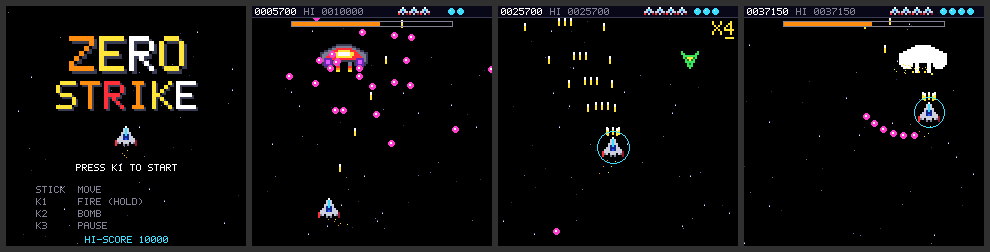
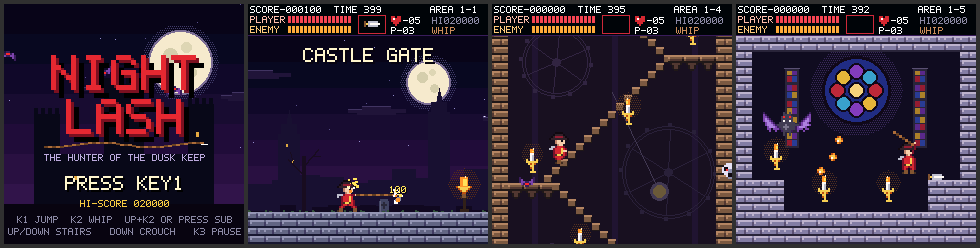
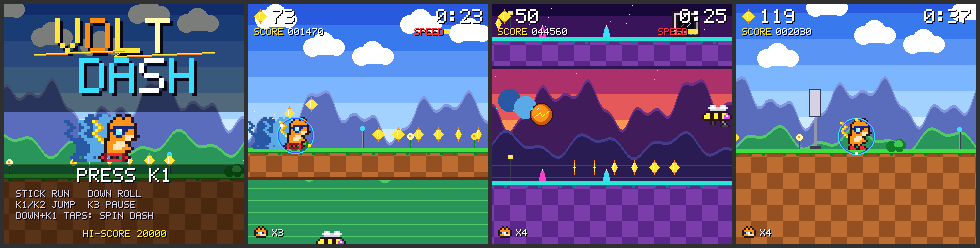
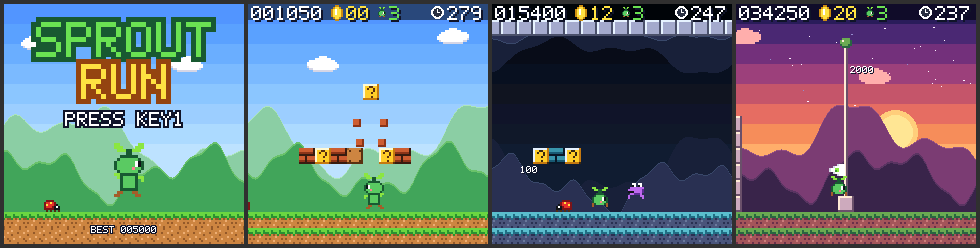
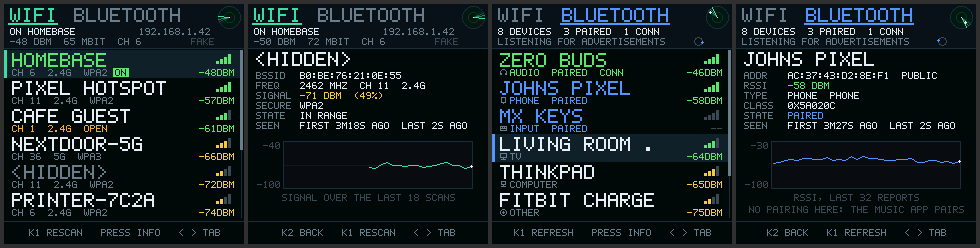
The screenshots are from the repo's headless backend, which draws exactly what the panel shows.
Status
- The driver is verified on a real Pi Zero W with the HAT. More apps are on the way.
- In the browser, high scores aren't kept (each Play starts the game fresh), Radar shows made-up data, and Music plays demo tunes on pretend speakers. Desk, Network, Terminal and Power need the Pi, so they aren't in the browser version.
Credits
Code, games and art by John O'Dell, from his zero-game project (not public yet). The browser version is built with Emscripten (MIT), and the backend that runs it in the page is this site's own, as are Music's demo tunes and its stand-in for the music service. The 1.3inch LCD HAT is made by Waveshare.